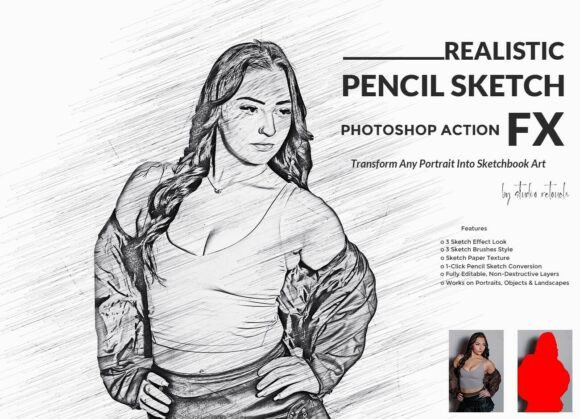
Transform Your Photos with Realistic Pencil Sketch FX Photoshop Action
For photographers, digital artists, and designers seeking a professional way to convert images into hand-drawn pencil sketches, the Realistic Pencil Sketch FX Photoshop Action is a powerful tool. This Photoshop action streamlines the creative process by delivering detailed graphite linework, soft shading, and authentic pencil strokes with just a single click. Whether you're working on portraits, landscapes, or product visuals, this action brings a timeless, artistic touch to your digital workflow.
Why Use Realistic Pencil Sketch FX?
Creating pencil sketches manually in Photoshop can be time-consuming and technically demanding. The Realistic Pencil Sketch FX Photoshop Action eliminates the guesswork by automating complex layer adjustments, texture overlays, and brush effects. Designed for efficiency and quality, this action ensures your final output mimics the depth and nuance of traditional pencil art.
One of the standout features is its one-click conversion, which makes it accessible even for beginners. With a few adjustments, you can achieve a variety of sketch styles that adapt to your subject matter, whether it’s a portrait, a still life, or an architectural shot.
Supported Photoshop Versions
This action is compatible with a wide range of Photoshop versions, including CS6, CC, CC2014, CC2015, CC2015.5, CC2016, CC2017, CC2018, CC2019, CC2020, CC2021, and CC2022 (English Version). This broad compatibility ensures that users don’t need the latest software to benefit from its features. It’s especially useful for creatives who may not be on the most recent Photoshop update but still want access to high-quality effects.
Getting Started: Image Preparation
Before running the action, it's important to prepare your image correctly. Start by opening your photo in Photoshop. Then, resize it using the crop tool. In the top menu bar, you’ll see three input fields labeled W x H x Reso. Enter the following values:
- Width (W): 3000px
- Height (H): 2000px
- Resolution: 72
Press Enter to apply the changes. This step ensures optimal output quality and performance when applying the pencil sketch effect.
Layer Setup for Best Results
Once your image is resized, create a new layer and name it “paint” (in lowercase). This layer will be used for brush adjustments to highlight specific areas of your image. Select a soft brush and gently paint over the focal point—this could be a subject’s face in a portrait or a key element in a landscape.
After setting up your layer, simply click the Action Play button to run the Realistic Pencil Sketch FX Photoshop Action. The process will begin automatically, applying a combination of pencil strokes, shading, and paper texture to your image.
What’s Included in the Package
The Realistic Pencil Sketch FX package is comprehensive and includes the following files:
- ATN File: The Photoshop Action file itself.
- Brush File: Custom brushes used to enhance the sketch effect.
- Pattern File: For adding realistic paper textures.
- Help File & PDF Guide: Step-by-step instructions for setup and use.
- Video Guide: A visual tutorial to walk you through the process.
This bundle ensures that users have all the tools and guidance needed to achieve professional results, even if they’re new to Photoshop actions.
Customization and Flexibility
While the action runs automatically, it’s also fully editable and non-destructive, meaning you can tweak individual layers to suit your style. This flexibility is crucial for professionals who want to fine-tune elements like contrast, line intensity, or texture depth.
The action offers:
- 3 Sketch Brush Styles: Choose from different pencil stroke types to match your artistic vision.
- 3 Sketch Effect Looks: From soft graphite to bold charcoal, you can select the best look for your project.
- Sketch Paper Texture: Adds authenticity and depth to the final output.
These variations allow for creative experimentation without starting from scratch each time.
Use Cases Across Industries
The Realistic Pencil Sketch FX Photoshop Action is versatile enough to be used in multiple creative fields. Here are a few examples:
- Portrait Photographers: Convert client portraits into elegant pencil drawings for print or digital portfolios.
- Graphic Designers: Use the action to create vintage-style illustrations for branding or marketing materials.
- Artists and Illustrators: Use it as a base for digital paintings or mixed-media projects.
- Interior Designers: Apply the sketch effect to renderings or floor plans for a hand-drawn presentation style.
Its adaptability makes it a valuable asset for anyone looking to add a classic, artistic flair to their digital work.
Performance and Output Quality
One of the major advantages of this action is its performance efficiency. Even on older Photoshop versions, the action runs smoothly without lag or crashes. It also maintains high resolution and detail, which is essential for both digital and print applications.
The use of non-destructive layers ensures that original image data remains intact. You can go back and adjust any layer at any time without compromising image quality. This is especially useful in client-based work where revisions are common.
Tips for Best Results
To get the most out of the Realistic Pencil Sketch FX Photoshop Action, consider the following tips:
- Use high-quality source images: The better the original photo, the more detailed and accurate the pencil sketch will be.
- Experiment with layer blending modes: Adjust blending modes on the sketch layers to create unique effects.
- Combine with other actions: Layer this effect with vintage filters or color grading actions for a composite look.
- Use the “paint” layer strategically: Focus your brush strokes on the main subject to guide the viewer’s eye.
These small adjustments can make a big difference in the final output and help you tailor the sketch to your specific project needs.
Conclusion
The Realistic Pencil Sketch FX Photoshop Action is more than just a tool—it’s a creative shortcut that brings a classic art style into the digital age. With its intuitive design, compatibility across versions, and customizable features, it empowers photographers, designers, and artists to enhance their work efficiently and professionally.
Whether you're looking to add a personal touch to your portfolio or create stylized visuals for clients, this Photoshop action offers a seamless and reliable way to transform photos into hand-drawn masterpieces.