Gold Antique Photoshop Action: Transform Photos into Luxurious Art
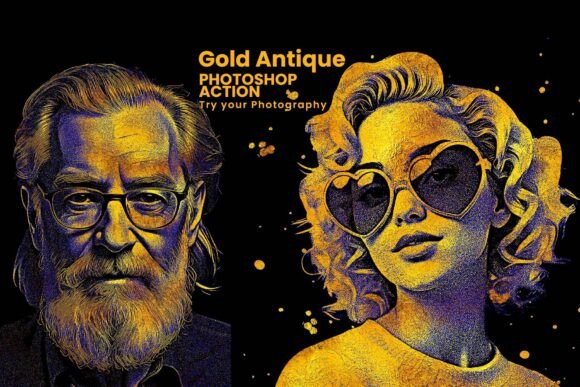
Looking to elevate your digital images with a touch of timeless elegance? The Gold Antique Photoshop Action is a powerful tool that transforms ordinary photos into stunning gold-engraved masterpieces. Whether you're a professional designer, photographer, or a creative hobbyist, this action offers a seamless way to add a vintage, high-end aesthetic to your visuals.
What Is the Gold Antique Photoshop Action?
This Photoshop action is a pre-configured set of steps that automates the creation of a rich, gold-etched effect. It mimics the look of antique engravings, blending deep contrasts with metallic textures. The result is a visually compelling image that exudes sophistication and artistic depth.
Bundled with custom brushes and pattern files, the Gold Antique Photoshop Action ensures you have everything needed to refine and personalize the effect. It’s ideal for portraits, fashion photography, branding visuals, and creative design projects that demand a luxurious vintage flair.
Key Features That Stand Out
- One-Click Gold Engraving Effect – Apply a detailed, high-contrast gold and black finish in seconds.
- High-Resolution Output – Perfect for both digital and print use, including posters, portfolios, and social media content.
- Customizable Layers – Adjust tones, textures, and overlays to match your creative vision without altering the original image.
- Non-Destructive Editing – Preserve your source photo while experimenting with different effects and adjustments.
- Compatibility – Works seamlessly with Photoshop CC2015.5 and later versions (English edition).
Why It’s a Must-Have for Designers and Photographers
Time is a valuable resource, especially in fast-paced creative industries. The Gold Antique Photoshop Action streamlines your workflow by eliminating the need to manually recreate complex gold textures and engravings. This means you can focus more on composition and storytelling rather than technical execution.
For photographers, this action is a game-changer when offering premium portrait packages. Imagine delivering a series of modern and antique-styled images from the same session — giving clients a curated, artistic experience. For graphic designers, it opens up new branding possibilities by integrating gold textures into logos, invitations, and editorial layouts.
Practical Applications Across Industries
From personal projects to commercial branding, the versatility of the Gold Antique Photoshop Action makes it a valuable asset in multiple contexts:
- Wedding and Portrait Photography: Add a vintage gold finish to engagement portraits or family heirloom-style images.
- Fashion and Editorial Shoots: Enhance editorial spreads with a dramatic, metallic look that stands out in print and online.
- Brand Identity: Use the effect to create distinctive logo treatments, packaging designs, or promotional materials that convey luxury.
- Art and Illustration: Digital artists can blend traditional illustration with modern tools to produce gallery-worthy prints.
- Marketing and Social Media: Unique visuals capture attention. Use gold-engraved images for Instagram posts, banners, or digital ads to elevate your brand’s visual presence.
Real-World Examples and Use Cases
Let’s say you’re designing a wedding invitation suite. Using the Gold Antique Photoshop Action, you can turn a simple floral background into a richly textured, gold-etched design that feels both classic and opulent. This small detail can significantly influence how your clients perceive the quality and thoughtfulness of your work.
Or imagine a lifestyle blogger who wants to differentiate their visual content. By applying the action to select images, they can create a cohesive, high-end aesthetic across their blog and Instagram feed — enhancing engagement and brand recognition.
For educators teaching digital art or graphic design, this action serves as a practical teaching tool. Students can explore how layers, masks, and blending modes work together to create complex effects — all while producing visually striking results.
How to Get the Most Out of the Action
The Gold Antique Photoshop Action comes with a detailed help file, making it accessible even for beginners. However, here are a few tips to help you maximize its potential:
- Start with high-quality images: Clear, well-lit photos yield the best results when applying texture-heavy effects.
- Experiment with layer blending modes: Adjusting the opacity or blending mode of the effect layers can create subtle or dramatic variations.
- Combine with other assets: Use the included brushes and patterns to add finishing touches like ornate frames or background textures.
- Customize the color tones: While the default is gold and black, you can tweak the color balance to create sepia, bronze, or copper variations.
- Use on specific elements: Instead of applying the effect to an entire image, try applying it selectively to faces, objects, or focal points for a more nuanced result.
Final Thoughts
The Gold Antique Photoshop Action is more than just a visual filter — it’s a creative tool that bridges traditional artistry with modern digital techniques. Whether you're looking to enhance your portfolio, elevate client work, or simply explore new artistic expressions, this action delivers both efficiency and elegance.
With its intuitive design, non-destructive workflow, and versatile application, it’s an investment that pays off in both time saved and visual impact gained. And with lifetime updates, you can be confident that the action will continue to perform well with future Photoshop versions.