Vector Acrylic Circular Brush Strokes
Bring Handmade Energy to Your Digital Designs
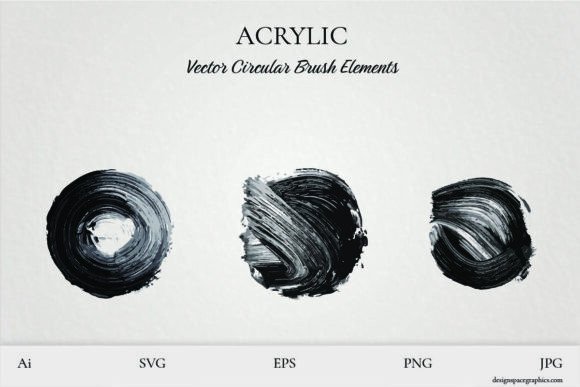
Vector Acrylic Circular Brush Strokes offer a seamless blend of organic texture and digital flexibility. Inspired by real acrylic paint strokes, these design elements capture the expressive, layered look of physical brushwork—without the cleanup. Whether you're creating digital art, print graphics, or product visuals, these circular strokes provide a painterly depth that elevates your work. Each stroke is crafted to maintain clarity at any size, making them ideal for both large-format prints and small-scale digital applications.
Why These Brush Strokes Stand Out
Unlike generic textures or flat graphics, these circular brush strokes carry a sense of motion and intention. Their vector format ensures crisp scalability, while their acrylic-inspired edges and blends give them a tactile, artistic feel. The collection includes variations in density and contrast, from soft washes to bold, textured marks. This range allows for layered compositions or standalone impact, depending on your design goals.
Because they're delivered in multiple file types—AI, EPS, SVG, JPG, and PNG—you can easily import them into Adobe Illustrator, Photoshop, Canva, Procreate, or any major design tool. You're not limited to static placement either—you can convert them into custom brushes for more dynamic, repeatable use in your workflow.
Creative Uses Across Mediums
These brush strokes are designed to be flexible, not just visually but functionally. Here are some ways you can integrate them into different types of creative work:
- Wall Art & Prints: Use a bold stroke as a background accent or focal point for modern abstract art prints. Pair with minimalist typography for a balanced, contemporary look.
- Brand Identity: Incorporate strokes into logo designs or packaging for a handcrafted, expressive brand feel—especially effective for lifestyle brands, artists, or boutique labels.
- Apparel & Merch: Add a circular stroke behind a t-shirt graphic or use it as a frame for a central image. Works especially well with vintage or streetwear aesthetics.
- Product Mockups: Enhance digital mockups for mugs, tumblers, or phone cases with a painterly edge that simulates real brushwork.
- Social Media Visuals: Use strokes to frame posts, highlight text, or add depth to flat layouts. They work well in Instagram stories, Pinterest graphics, or blog headers.
How Different Creators Can Use These Strokes
Whether you're a seasoned designer or a small business owner looking to add visual interest to your marketing materials, these brush strokes offer practical value across experience levels and goals:
- Digital Artists: Layer strokes into illustrations or digital paintings to simulate physical brushwork without leaving your software. Try blending modes like Multiply or Overlay for painterly effects.
- Graphic Designers: Use them to break up flat backgrounds, add texture to icons or infographics, or create dynamic transitions between design elements.
- DIY Crafters: Import them into Cricut or Silhouette software to cut acrylic-style brush strokes from vinyl or paper for handmade cards, wall art, or custom gifts.
- Small Business Owners: Apply them to product packaging, labels, or promotional graphics to give your brand a more personal, artisanal touch.
- Content Creators: Use strokes to enhance thumbnails, social media posts, or website headers with a professional, expressive edge.
Design Tips for Best Results
To get the most from these brush strokes without overwhelming your design, consider the following tips:
- Balance is key: If you're using a detailed stroke as a background, keep other elements minimal to avoid visual clutter.
- Experiment with color: These strokes work well in monochrome, duotone, or full color. Try recoloring them to match your brand palette or project theme.
- Layer for depth: Combine multiple strokes at different opacities to create a sense of movement and dimensionality.
- Use smart scaling: Even though they’re vector-based, avoid shrinking them too small in print—especially if they contain fine details.
- Customize brushes: If you're turning them into custom brushes in Photoshop or Illustrator, adjust spacing and scattering to maintain a natural look.
From Concept to Creation: Project Ideas to Try
If you're looking for inspiration or a starting point, here are a few project ideas that make great use of these brush strokes:
- Abstract Calendar Layouts: Use a different stroke each month as a visual anchor in your design.
- Modern Poster Series: Frame event or product names with a dramatic stroke to draw attention and add texture.
- Artistic Packaging Labels: Apply a subtle stroke behind a product label or logo to give it a custom, boutique feel.
- Custom Tumbler Wraps: Wrap a circular stroke around the body of a tumbler mockup for a painterly look that mimics real brushwork.
- Instagram Story Templates: Build animated story templates using strokes as animated transitions or background elements.
Final Thoughts: Design with Purpose and Personality
Vector Acrylic Circular Brush Strokes are more than just design flourishes—they're tools that help you inject personality, motion, and depth into your work. Whether you're designing for print, web, or physical products, these strokes offer a flexible, high-impact way to stand out. By choosing the right stroke for your context, applying thoughtful color and layout choices, and using them with intention, you can bring a fresh, artistic edge to your creative projects—without sacrificing clarity or professionalism.